
The readyplace knowledge cycle: knowledge in five phases
How digital adoption works with readyplace
readyplace treats process knowledge as a living system: created with AI, managed centrally, delivered where questions arise, and improved based on real usage. Outdated knowledge surfaces automatically.
The cycle runs through all five phases and improves two things with every pass: how knowledge is delivered and how good it is.
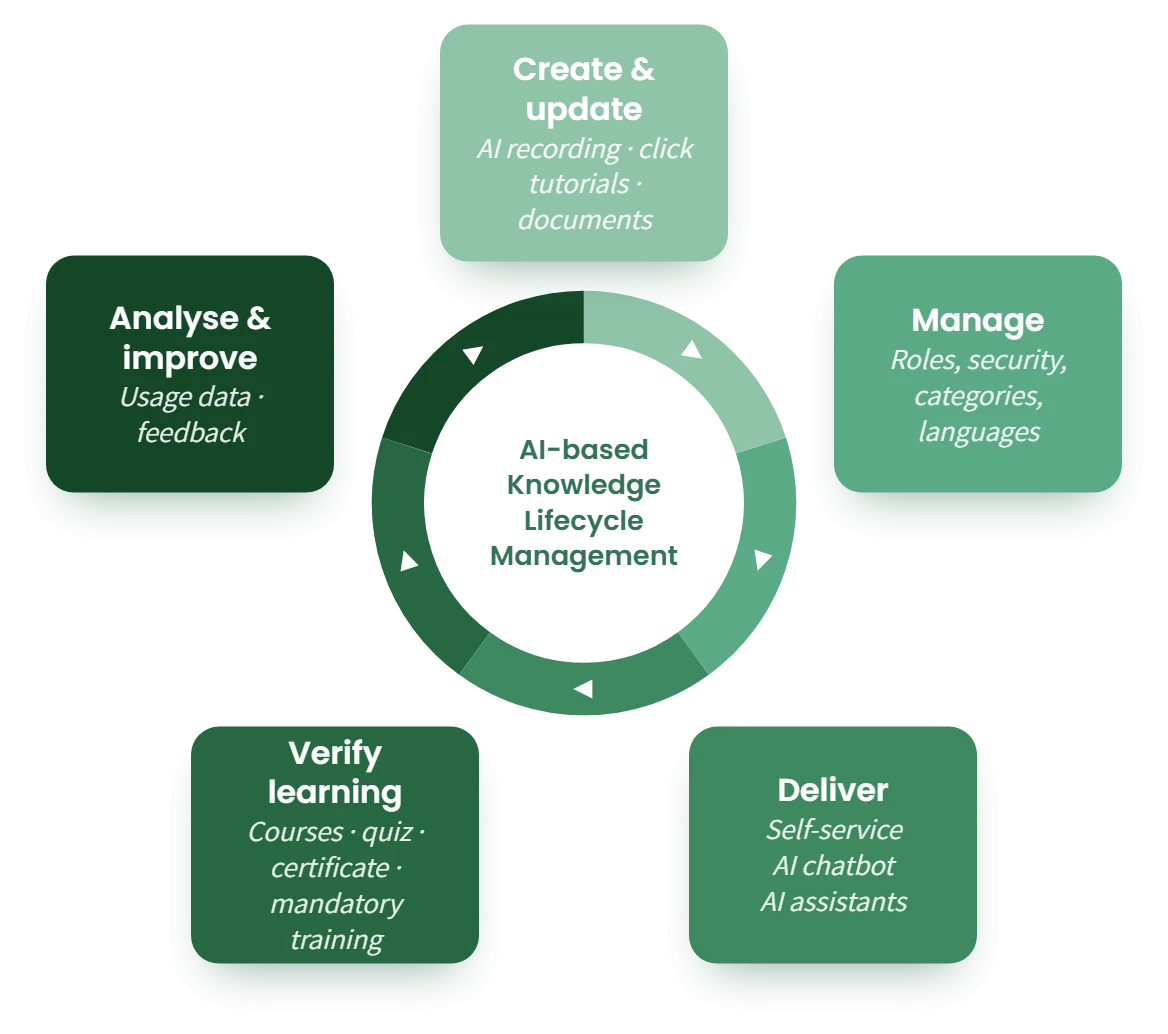
1. Create & update
Click once, the AI documents.
Your teams run a process once with the readyator, the AI turns it into an interactive guide – automatically translated into every language. Existing documents, screenshots and videos are included as well. Far faster than text, PDF or video, and at the user’s own pace: “Answer every question only once.”
- AI-assisted creation: Run a process once – readyplace records every click and turns it into an interactive guide. Platform-independent, without touching your software.
- Translation into over 50 languages: Content is translated automatically and stays in sync when things change, including accessible languages.
- GDPR-compliant & secure: Hosted in Germany with the highest data protection standards. Sensitive data in recordings can be fully masked.
More on software rollouts with readyplace →
2. Manage
Roles, security, categories and languages.
Manage guides, documents and articles in one place. Use roles and access permissions to decide who sees which knowledge: internal only or your entire ecosystem. All in a dedicated admin dashboard – clear, secure and reliable.
- Role management: Assign clear roles to your team and control access permissions to content. Every responsibility stays clearly defined.
- Content management: Review content in a staging environment before releasing it. Manage guides, documents, categories, tags and glossary terms – all in one admin dashboard.
- Multilingual: Offer the same content in several languages and manage all versions centrally – for teams and customers worldwide.
How tax firms relieve their teams →
3. Deliver
Self-service, AI chatbot and AI assistants.
Good knowledge is useless if nobody finds it. That is why readyplace makes it accessible exactly where questions arise: in the self-service desk, embedded in the help centre, as an AI chatbot answer or via the MCP connector directly inside your users’ AI assistant. Every answer is one click away and always current.
- Self-service desk (internal & external): Provide knowledge to employees via an internal desk and to customers via a public desk – by link, QR code or help-centre embedding, on any device.
- Interactive readyplace click tutorials: Our click tutorials lead step by step through any process – easy to follow, with tooltips and highlights, at your own pace, and across system boundaries.
- Documents, articles and SCORM export: It is not only click tutorials that get delivered: documents and multimedia articles are just as easy to find. Your tutorials can also be exported as a SCORM package – for Moodle, ILIAS and other learning management systems.
- AI chatbot: Users get answers to their questions around the clock – in the self-service desk, the help centre or the intranet, with separate roles for internal and external users.
- Curated knowledge at hand: The AI chatbot answers questions from your approved content and links the matching documents and tutorials. No invented answers. External data sources can be connected to the chatbot as well.
- AI assistants & single source of truth: All processes in one place, searchable and current. Via the MCP connector (pilot) this knowledge is also available to AI assistants such as Claude or ChatGPT.
More on the self-service desk for your helpdesk →
4. Verify learning
Courses with quiz and certificate.
Knowledge that is available is not yet knowledge that is proven. With readyTrain, existing guides and documents become multi-stage courses: employees work through them at their own pace, prove their knowledge in a quiz and receive a certificate – without a separate learning management system.
- A sequence instead of a collection: A course leads through a topic stage by stage, with a clear end. For onboarding, rollouts and mandatory training that is the difference between “available” and “worked through”.
- No second system: Content, roles and users are already in readyplace. No duplicate maintenance, no export to a learning management system. The AI suggests quiz questions from the course content.
- Proof that counts: Quiz with a pass mark, certificate as a PDF and a report showing who started and who finished. For personnel files, audits and customer certification, repeatable every year.
More on courses and certificates →
5. Analyse & improve
Knowledge that grows with you.
Delivering knowledge is not the end but the beginning. readyplace shows you how your content is really used, collects direct user feedback and turns it into concrete improvements. One-off knowledge becomes a living cycle that grows more valuable with every pass.
- Analyse: The admin dashboard shows usage, search queries and chatbot input. You see which knowledge is missing and which is outdated.
- Collect user feedback: Users give ratings, suggestions and problem reports directly in the content. You see this feedback in the admin area and work it in.
- Improve: With structured feedback and clear usage data you optimise your content quickly – and perfect your knowledge transfer.
More on onboarding with readyplace →
The result
More efficiency and significantly lower costs in onboarding, service and helpdesk, software documentation and software rollouts. Suitable for every industry – our customers include tax firms, software vendors, construction companies, municipalities and auditors.